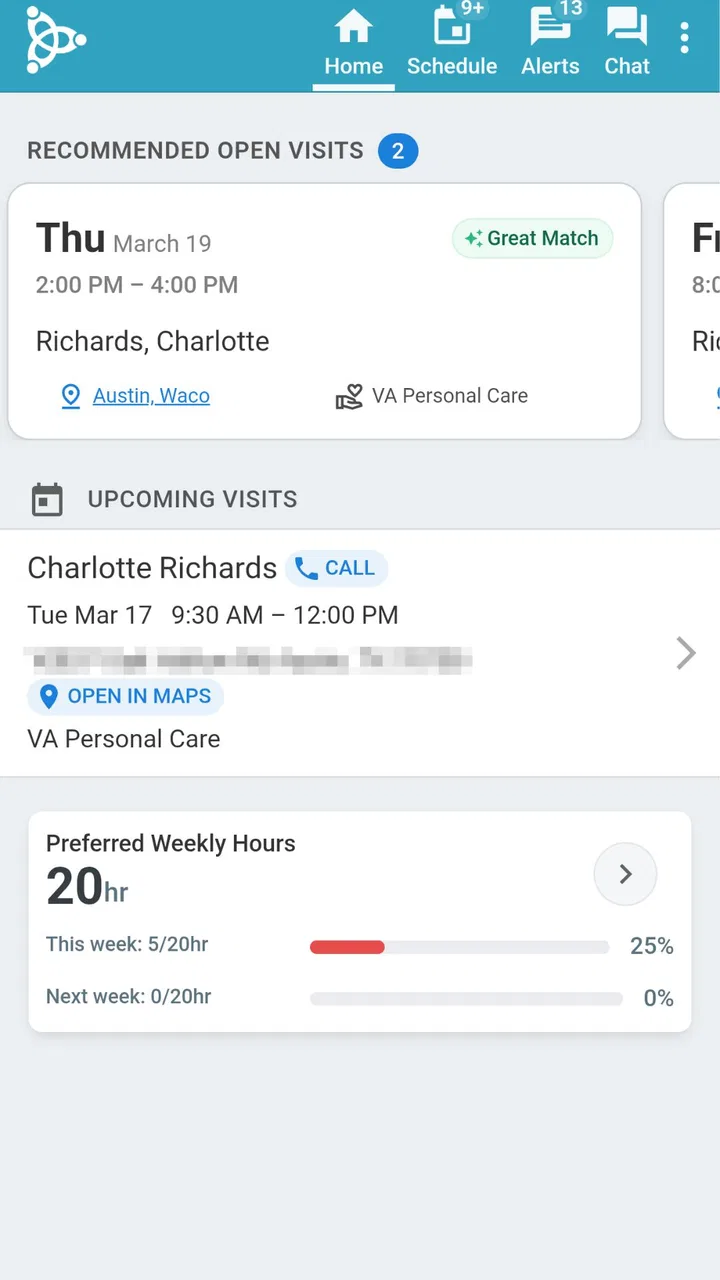
AxisCare Mobile
- 4.8
- Rating
- 500.00K
- Installs
- Free
- Price

 Analysis by App-foxy
When I look at a business app, I care less about a polished first impression and more about whether it behaves sensibly during a busy workday. AxisCare Mobile is built for caregivers and administrators, so its value depends on practical coordination rather than entertainment or broad consumer appeal. I approached it as a tool for home-care work: something that should help people stay aligned while moving between clients, appointments, notes, and office responsibilities.
That focus makes it easier to understand what this app is and what it is not. It is a free business app from AxisCare, intended for organizations already working with the AxisCare system. It is not a general calendar, a standalone invoicing tool, or a casual task manager that anyone can open and use without an account structure behind it. In my experience, that distinction matters more than the download itself.
The app has been available since May 11, 2016, and its current version is 3.45.2. It is rated for Everyone and works on devices running Android 9 or later. Its public reception is strong, with an average rating of 4.8 from around 20 thousand ratings, while its reach has passed 500 thousand installs. Those figures suggest that it has found a real audience among care professionals, although they should not be mistaken for proof that it will suit every agency or every caregiver workflow.
You May Also Like

 Blood Strike: 2.5 Anniversary
Blood Strike’s Loadouts Turn Every Drop Into a Tactical Gamble
A close look at Blood Strike’s custom loadouts: how fast access to signature weapons reshapes its battle royale rhythm, rewards preparation, and narrows the gap between fights.

 Pandora - Music & Podcasts
Pandora’s Music Is Easy to Start, but Harder to Recover
Pandora’s strength is its low-effort path from a seed to a station. Its weak spot is how much confidence it asks you to place in connection, setup, and quiet recovery.

 8 Ball Pool
 Is Built on Rivalries, Rematches, and Routine
A close look at the rivalries, rematches, shared routines, and unanswered safety questions that turn a quick pool match into a persistent mobile community.

 Samsung Music
’s Quiet Strength Is Playing What You Already Own
Its reach comes less from spectacle than from dependable access to a personal library. That simplicity is both the app’s strongest retention engine and its ceiling.

 AccuWeather: Weather Radar
AccuWeather Review: A Quick, Clear Forecast for Everyday Decisions
For everyday plans, the best forecast is the one you can understand quickly. AccuWeather makes rain timing, radar, and local conditions easy to act on, with a few trade-offs.

 Hill Climb Racing
Why Hill Climb Racing Still Turns Crashes Into One More Run
A tiny car, a bumpy hill and one more upgrade: Hill Climb Racing keeps resurfacing because its simple chaos makes every near-miss feel personal.
More From Our News Desk



How AxisCare Mobile fits into a care team
The most useful way to think about this app is as a mobile working surface for an existing care operation. A caregiver may need to check the day’s responsibilities away from a desk, while an administrator may need a mobile view of activity that would otherwise require a computer. The app’s purpose is therefore tied to the relationship between field staff and office staff.
That connection creates a different trust question from the one I would ask about a normal productivity app. With a personal to-do list, a small inconvenience is mostly annoying. In home care, confusion around an appointment or an incomplete update can affect a client, a family, a caregiver, and the office at the same time. I would judge AxisCare Mobile by whether it helps users work from the right information and whether it gives them enough control to notice when something needs attention.
The developer, AxisCare, is clearly associated with the business platform rather than presenting this as an isolated mobile utility. That is a strength for teams that already use the wider service because the mobile experience can fit into an established administrative process. It is also a limitation for someone hoping to download the app and immediately create an independent care schedule. This is a system-facing tool, not a blank workspace.
A realistic example is a caregiver leaving one visit and preparing for the next. Instead of waiting until returning to an office computer, the worker can use the mobile app as the point of contact with the organization’s current schedule and work process. The benefit is not merely saving a few taps. It is reducing the temptation to rely on memory, paper notes, personal messages, or a separate calendar that may become outdated.
For an administrator, the same scenario looks different. The mobile device becomes a way to remain connected to field activity without treating every small update as a reason to sit at a desk. That can be useful during a day filled with calls, schedule changes, and staff questions. Still, I would not assume that a mobile interface replaces the deeper planning and reporting work normally handled in the main business system. A phone is convenient, but it is not automatically the best place for complex administrative decisions.
Trust starts with the account relationship
The first practical question for a prospective user is whether the organization already has the AxisCare setup needed to use the app. The app’s description identifies it as a mobile tool for caregivers and administrators, which tells me that it is designed around managed access rather than anonymous use. If you are an individual caregiver looking for a private way to organize clients, this is probably the wrong starting point.
That account-centered design is important from a trust perspective. A care worker should not have to recreate client information manually in a personal app just to stay organized, and an agency should not have to depend on scattered consumer tools for operational details. At the same time, an account-based system means the user experience depends partly on decisions made by the organization: who receives access, what role they have, and how the agency handles changes when someone joins or leaves.
I would ask an administrator to explain the onboarding process before asking staff to rely on the app. In particular, confirm which account is used, who manages access, and what a caregiver should do after changing phones or losing access. These are not glamorous questions, but they are the situations that reveal whether an app is genuinely workable in the field.
For a caregiver, the most useful habit is to treat the app as the official work channel rather than keeping a second unofficial record of everything. A private backup may feel safer, but duplicating sensitive details across notebooks, screenshots, and personal apps can create its own risk. I would keep personal notes limited to what is genuinely necessary and follow the agency’s instructions for handling work information.
What I would check before trusting it with daily work
The app’s visible facts make a few things clear: it is free to download, it has a general-audience content rating, and it supports relatively recent Android devices through Android 9. Those details remove some basic barriers, but they do not answer the operational questions that matter most to a care team. A free app can still require an organizational account, training, and a dependable process around it.
Before rollout, I would test the app with a small group rather than asking every caregiver to change habits at once. Use a normal workday scenario, then deliberately check the awkward moments: a schedule adjustment, a device change, an interrupted connection, and a correction to an earlier entry. The goal is not to search for failure theatrically. It is to discover where staff might improvise and accidentally create inconsistent records.
I would also separate app problems from process problems. If a caregiver cannot find the right information, the cause might be the interface, but it might also be an unclear role, an incomplete account setup, or an office workflow that was never explained. AxisCare Mobile can support a care operation, but it cannot decide the organization’s policies for it.
One useful tip is to establish a simple rule for urgent communication. A mobile business app may be the right place for routine work information, but a team should know which channel to use when a matter needs immediate human attention. That rule protects users from assuming that every update inside an app is seen instantly by the person who needs it.
Data-sensitive moments deserve extra care
Care work naturally involves information that should be handled thoughtfully. Even without making assumptions about the app’s internal data practices, I would treat every client-related screen as work information rather than ordinary personal content. That means being careful about who can see the phone, where the screen is opened, and whether details are left visible in a shared environment.
The most sensitive moments are often ordinary ones. A caregiver may check the app in a reception area, leave a device unlocked in a vehicle, or show a schedule while another person is nearby. These are user-behavior issues, but the app’s convenience can make them easier to overlook. I would encourage staff to lock the device when stepping away and avoid capturing screenshots of client-related material unless the organization explicitly permits it.
Administrators should also think about role boundaries. A person who needs mobile access for visits may not need the same level of visibility as someone handling scheduling or office administration. The safest approach is to give each worker the access required for their job and review that access when responsibilities change. The app can be part of that discipline, but account governance remains an organizational responsibility.
Another practical trade-off concerns personal devices. Allowing staff to use their own phones can make deployment faster and reduce hardware costs, but it also places work information on devices the organization may not fully control. I would want a clear internal policy covering lost phones, staff departures, device sharing, and support requests. Those policies matter just as much as the app’s download and installation process.
When an app is used around care information, I also prefer visible user choices over silent assumptions. Users should understand which account they are using and what action they are taking before submitting an update. If a screen is unclear, the right response is to pause and ask the office rather than guessing. A small clarification is preferable to an incorrect record that later has to be untangled.
Where the mobile format helps, and where it gets in the way
The strongest argument for AxisCare Mobile is mobility itself. Caregivers do not spend the entire day at a workstation, and administrators may need to respond while away from one. A mobile app can place the organization’s workflow closer to the moment when work happens, which is more useful than entering everything from memory at the end of a shift.
That advantage is especially noticeable when the alternative is a paper schedule or a personal calendar. Paper can be easy to annotate but difficult to keep current across a team. A personal calendar may be familiar, yet it separates work information from the organization’s official process. AxisCare Mobile is more appropriate when the agency needs staff and office personnel to work from a shared operational context.
The trade-off is that mobile screens are not ideal for every task. Reviewing a complicated week, comparing many people’s schedules, or handling detailed administrative work may be more comfortable on a larger screen. I would use the mobile app for timely field access and quick work actions, while expecting the broader AxisCare environment to remain important for office-heavy tasks.
There is also a human-factor limitation. A caregiver who is moving between visits needs an interface that is easy to understand under pressure. If a workflow requires too much searching or repeated correction, the theoretical advantage of mobile access can disappear. This is why I would judge the app during realistic movement and interruptions, not only while sitting calmly at home with unlimited time.
A useful workflow tip is to review the day before leaving for the first visit, then check again after any message from the office that could change the plan. That creates two deliberate points for catching changes without encouraging constant phone checking. It also gives the caregiver a chance to identify an unclear item early, when there is still time to ask someone for help.
Who will get the most from it
AxisCare Mobile makes the most sense for caregivers whose agencies already depend on AxisCare and want field staff to stay connected to the same business process. It can also suit administrators who need a mobile companion for work that cannot always wait until they return to a computer.
I would recommend it more confidently to teams that are prepared to define access roles, train staff on sensitive information, and decide which situations require direct contact with the office. In that setting, the app can become a practical bridge between scheduled care and real-world movement.
I would be more cautious for a small independent caregiver who simply wants a personal planner. The app’s business orientation may introduce account and organizational requirements that are unnecessary for one person. A simpler calendar or task app could be easier if there is no agency workflow to connect to, provided it is appropriate for the information being recorded.
It may also be a poor fit for organizations that want to run everything from mobile devices without any supporting administrative process. The app should not be expected to solve unclear responsibilities, weak communication habits, or inconsistent record-keeping by itself. Technology can make a good process easier to follow, but it rarely repairs a process that nobody has agreed on.
My cautious verdict after weighing the trade-offs
I see AxisCare Mobile as a focused business companion rather than a universal app for care work. Its appeal comes from putting an AxisCare-based workflow closer to caregivers and administrators, especially when the working day takes place away from a desk. The strong rating and broad install base indicate that many users find value in that approach, while the free price removes one obvious barrier to trying it.
My recommendation depends on context. If your organization already uses AxisCare, I think this app is worth evaluating as part of a controlled rollout. Start with the account process, clarify responsibilities, test ordinary and awkward scenarios, and make privacy-conscious phone habits part of training. Do not measure success only by whether staff can install it; measure whether they can use it without creating duplicate records or guessing at important steps.
If you are looking for a standalone personal organizer, I would skip it and choose a tool designed for individual planning. That is not a criticism of AxisCare Mobile; it is simply a matter of fit. Its value is tied to a managed care operation, and that connection is exactly what makes it less suitable for casual personal use.
For the right audience, the app offers a sensible way to keep mobile work closer to the organization’s official process. The trust decision is not just “Can I download it?” but “Can my team control access, handle sensitive moments, and know what to do when the normal workflow breaks?” If the answer is yes, AxisCare Mobile is a reasonable addition to a care team’s daily toolkit. If the answer is unclear, the organization should settle those basics before relying on any mobile system.
FAQs for AxisCare Mobile
01What is AxisCare Mobile used for?
AxisCare Mobile is designed to streamline the management of home care services. It allows caregivers to track schedules, log visits, and manage client information efficiently. The app is primarily used by home healthcare agencies to ensure seamless communication between caregivers and clients, improving overall service delivery.
02Is AxisCare Mobile compatible with both Android and iOS devices?
Yes, AxisCare Mobile is available for both Android and iOS platforms. Users can download the app from Google Play Store for Android devices and the Apple App Store for iOS devices. This cross-platform compatibility ensures that caregivers can access the app regardless of their device preference.
03How secure is the data in AxisCare Mobile?
AxisCare Mobile prioritizes the security of user data. It implements robust encryption protocols to protect sensitive information related to clients and caregivers. The app complies with industry standards, such as HIPAA, to ensure that all data is handled securely and confidentially.
04Does AxisCare Mobile offer scheduling features for caregivers?
Yes, AxisCare Mobile offers comprehensive scheduling features that help caregivers manage their shifts effectively. The app provides real-time updates on schedules, allowing caregivers to view their appointments, make changes, and receive notifications about any updates, making it easier to plan their workdays efficiently.
05Are there any costs associated with using AxisCare Mobile?
The cost of using AxisCare Mobile can vary depending on the specific plan or package chosen by the healthcare agency. While the app itself is free to download, agencies may incur charges based on the features and number of users. It's advisable to contact AxisCare for detailed pricing information.
Pros
- User-friendly interface for easy navigation.
- Real-time updates for caregivers and clients.
- Offers GPS tracking for safety and accuracy.
- Secure data handling with HIPAA compliance.
- Customizable scheduling features.
Cons
- Limited offline functionality.
- Occasional syncing delays.
- User interface can feel cluttered.
- Requires constant internet access.
- No dark mode option available.

AxisCare Mobile
Gallery